# GCP

**Real-time visualization is only supported for vpc, subnet and virtual server resource types as of today (Feb 08, 2024).**

### Changelog

#### Feb 8, 2024

* Created initial version descripting steps for setting up real-time visualization of GCP assets (vpc, subnet and vm).

#### Feb 10, 2024

* Updated instructions.

### Steps for setting up real-time updates

#### 1. Create a topic

* Go to console -> topics (use search bar to jump to this).
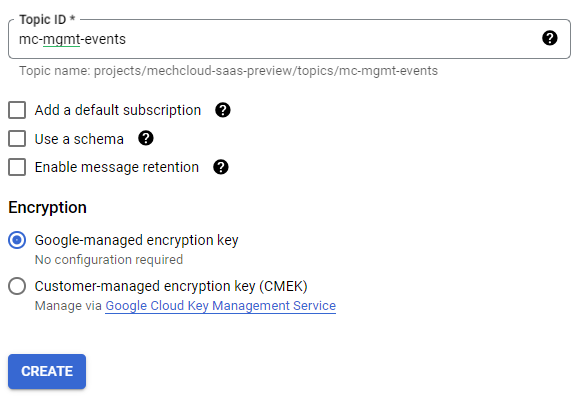
* Add a topic with **mc-mgmt-events** id (see below screenshot for other details)

<div align="left" data-full-width="false"><figure><img src="https://3435649067-files.gitbook.io/~/files/v0/b/gitbook-x-prod.appspot.com/o/spaces%2FQGHt89wn8Cn0pcK36Wir%2Fuploads%2FFJjBanG6NTvfd0usdYMX%2Fimage.png?alt=media&#x26;token=5b9b5c5f-6f8f-46d2-a72d-c674025c3dae" alt=""><figcaption></figcaption></figure></div>

* Click on newly created topic in the list of topics and then click on **TRIGGER CLOUD FUNCTION** link.
* Create a function with details as follows -
  * **Basics**
    * Environment - 2nd gen
    * Function name - process-mc-events
    * Region - Choose a region of your choice
  * **Trigger** - Leave it unchanged ( make sure it is having topic created in the previous step selected under **Cloud Pub/Sub topic** field.
  * **Runtime, build, connections and security settings (Choose other settings as per your convenience)**
    * **Runtime**
      * **Timeout -** 30 seconds
      * **Runtime environment variables** -
        * **TEAM\_ID** - d65e32d2-e18f-49a7-8cbf-e19205772ea0
        * **CLOUD\_ACCOUNT\_ID** - You can get this from **MechCloud console -> Infrastructure -> Cloud Accounts** page.
        * **ACCESS\_TOKEN** - Once you are logged into MechCloud, simply open a new tab, and enter <https://portal-preview.mechcloud.io/oauth2/auth1> url in the address bar. It will print your access/jwt token.
    * **Connections**
      * Ingress Settings **-** Allow internal traffic only
  * **Source code**
    * **Runtime** - Python 3.12
    * **Entry point** - process\_event
    * **Source code** - Inline editor
  * Make sure requirements.txt has following additional modules -
    * requests==2.31.0
  * Add following code under main.py file-

```python
import functions_framework, json, logging, base64, os, requests

@functions_framework.cloud_event
def process_event(cloud_event):

    try:
        print(cloud_event)

        event = base64.b64decode(cloud_event.data["message"]["data"])
        event_str = event.decode('utf-8')
        print('Event : ' + event_str)

        event_json = json.loads(event)
        
        service_name = event_json['protoPayload']['serviceName']
        method_name = event_json['protoPayload']['methodName']
        
        print("Service : '{}', Method : '{}'".format(service_name, method_name))

        team_id = os.environ.get('TEAM_ID')
        if not team_id:
            raise ValueError("TEAM_ID environment variable is missing")
        cloud_account_id = os.environ.get('CLOUD_ACCOUNT_ID')
        if not cloud_account_id:
            raise ValueError("ACCOUNT_ID environment variable is missing")
        access_token = os.environ.get('ACCESS_TOKEN')
        if not access_token:
            raise ValueError("ACCESS_TOKEN environment variable is missing")

        endpoint_url = f"https://mechcloud-preview-asia.mechcloud.io/mechcloud-turbine-discovery/v1.0/sync/events?cloudAccountId={cloud_account_id}"

        headers = {
            'Authorization': f"Bearer {access_token}",
            'Mc-Team-Id': f"{team_id}",
            'Referer': 'https://portal-preview.mechcloud.io/',
            'Content-Type': 'application/json'
        }

        response = requests.post(
                        endpoint_url, 
                        headers=headers, 
                        timeout=(5, 30), 
                        data=event_str
                    )

        status_code = response.status_code
        print('Status code : ' + str(status_code))
        print('Response : ' + response.text)
        if status_code == 200: 
            return f"OK"
        else:
            return f"Not OK"    
    except Exception as ex:
        print('Exception occured.')
        logging.error(ex, exc_info=True)
        
        return f"Not OK"
             
```

#### 2. Create log routing sinks

To visualize GCP resource in real-time, we will need to create one log routing sink per resource type (e.g. vpc). You can add a log routing sink by going to console -> logging (use search bar to jump to this) -> Log router and click on **Create sink** link to add a sink. Make sure you have following log routing sinks created -

<table data-full-width="true"><thead><tr><th>Sink Name</th><th>Sink Destination</th><th>Logs to include in sink</th></tr></thead><tbody><tr><td>mc-vpc-mgmt-events</td><td><strong>Service</strong> - Cloud Pub/Sub topic<br><strong>Topic</strong> - projects/&#x3C;project_name>/topics/mc-mgmt-events</td><td>resource.type="gce_network" protoPayload.methodName="beta.compute.networks.insert" OR protoPayload.methodName="v1.compute.networks.insert" OR protoPayload.methodName="beta.compute.networks.delete" OR protoPayload.methodName="v1.compute.networks.delete"</td></tr><tr><td>mc-subnet-mgmt-events</td><td><strong>Service</strong> - Cloud Pub/Sub topic<br><strong>Topic</strong> - projects/&#x3C;project_name>/topics/mc-mgmt-events</td><td>resource.type="gce_subnetwork" protoPayload.methodName="beta.compute.subnetworks.insert" OR protoPayload.methodName="v1.compute.subnetworks.insert" OR protoPayload.methodName="beta.compute.subnetworks.delete" OR protoPayload.methodName="v1.compute.subnetworks.delete"</td></tr><tr><td>mc-vm-mgmt-events</td><td><strong>Service</strong> - Cloud Pub/Sub topic<br><strong>Topic</strong> - projects/&#x3C;project_name>/topics/mc-mgmt-events</td><td>resource.type="gce_instance" protoPayload.methodName="beta.compute.subnetworks.insert" OR protoPayload.methodName="v1.compute.instances.insert" OR protoPayload.methodName="beta.compute.instances.delete" OR protoPayload.methodName="v1.compute.instances.delete" OR protoPayload.methodName="beta.compute.instances.start" OR protoPayload.methodName="v1.compute.instances.start" OR protoPayload.methodName="beta.compute.instances.stop" OR protoPayload.methodName="v1.compute.instances.stop"</td></tr></tbody></table>
